![LandZ Logo - Royal Blue.jpg]](https://go.londonandzurich.co.uk/hs-fs/hubfs/LandZ%20Logo%20-%20Royal%20Blue.jpg?height=40&name=LandZ%20Logo%20-%20Royal%20Blue.jpg)
You can cancel a Direct Debit retry in two ways:
Option 1: Cancel via the customer record
- Go to Direct Debits at the top of the screen.

- In the left-hand menu, select Customer > List Customers.
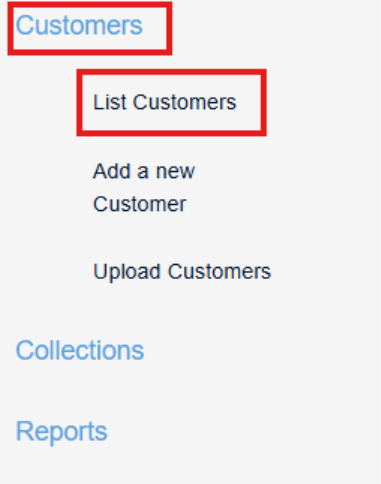
- Search for the relevant customer.
- Tip: The list defaults to your most recently added customers. Changing the view to All Customers may make searching easier.
- Click the underlined Customer Ref to open the customer record.
- Select the Collections tab.
- Locate the retry collection and click Cancel.
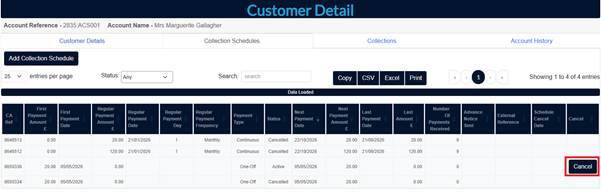
- Go to Direct Debits at the top of the screen.

Option 2: Cancel via the retry report.
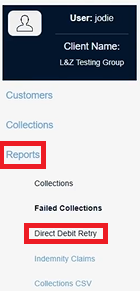
- In the left hand menu, select Reports > Direct Debit Retry.
- Locate the relevant retry record.
- If cancellation is available, click Cancel.
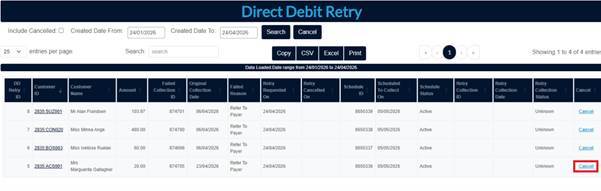
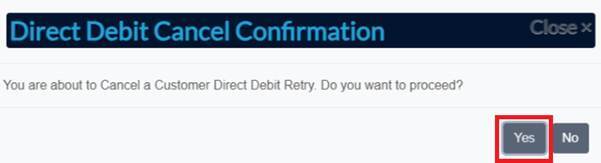
- Confirm cancellation by clicking Yes.
Important
Retries can only be cancelled before they enter the Bacs processing cycle.
Once submitted to Bacs, the retry cannot be cancelled or reversed.
If you have any questions, please contact our Customer Services team at customer.services@landz.co.uk.