![LandZ Logo - Royal Blue.jpg]](https://go.londonandzurich.co.uk/hs-fs/hubfs/LandZ%20Logo%20-%20Royal%20Blue.jpg?height=40&name=LandZ%20Logo%20-%20Royal%20Blue.jpg)
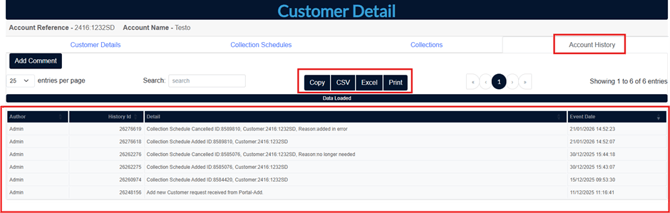
The Account History tab within the London & Zurich portal provides a detailed record of events from the point a new customer is added. It includes actions such as collection schedules being created or cancelled, as well as any BACS rejection advice.
For example, it will show if a customer’s bank has cancelled a Direct Debit following a payer’s instruction to their bank.
In essence, the Account History tab acts as a complete timeline of activity for each customer.
Please follow the steps below with the London and Zurich portal to access records of your customer (payer)
- Login to the L&Z portal.
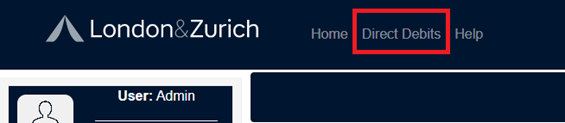
- Select the Direct Debits menu option from top menu pane
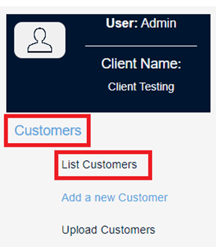
- Then select Customers and List Customers from left menu pane.
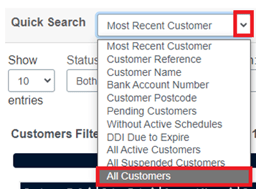
- From the Quick Search field drop down menu select All Customers.
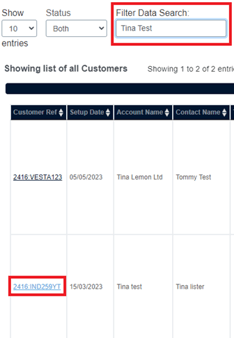
- Use the Filter Data Search field and enter either the name, account name or customer reference. This should then display the customer record. Click on the customer reference to load the customer information.
- You should now see the Customer Detail page which will show you 4 tabs and click on the tab entitled Account History to view more information.

-
You have the option to then export this into formats such as CSV, Excel or Print as PDF.
If you have any further queries please email customer.services@landz.co.uk.