![LandZ Logo - Royal Blue.jpg]](https://go.londonandzurich.co.uk/hs-fs/hubfs/LandZ%20Logo%20-%20Royal%20Blue.jpg?height=40&name=LandZ%20Logo%20-%20Royal%20Blue.jpg)
There are two ways to retry a failed collection:
• Retry a single failed collection
• Retry multiple failed collections in bulk
Single Failed collection.
- Go to Direct Debits at the top of the screen.

- In the left hand-menu, select Reports > Failed Collections.
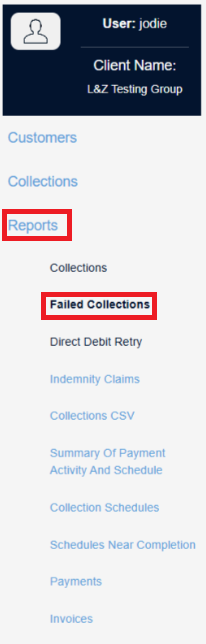
- Search using the relevant date range.

- In the far-right column, select the failed collection using the checkbox.
- Then click Submit.

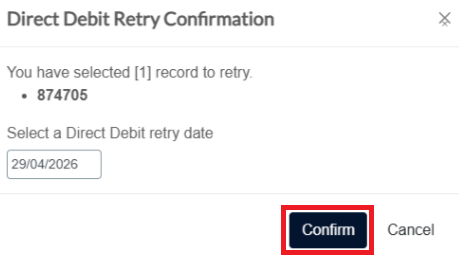
- Select the required retry date.
- Click Confirm.
- Go to Direct Debits at the top of the screen.

- In the left hand-menu, select Reports > Failed Collections.
- Search using the relevant date range.

- Select multiple failed collections using the checkboxes, or use the Select All checkbox in the header.
- Click Submit.

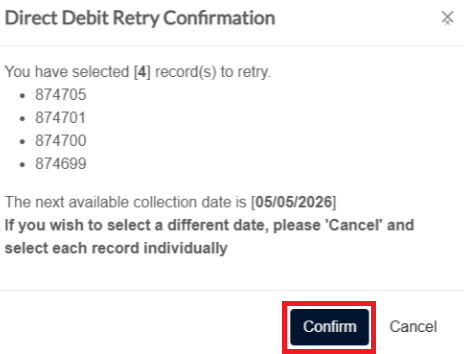
- Bulk retries will automatically use the next available collection date.
- Click Confirm to continue.
Important
• You can select a future retry date.
• The earliest available collection date will be highlighted in the calendar.
Bulk Failed Collections
Important
If you need to use different retry dates for bulk retries, you must:
- Cancel the bulk retries.
- Re-submit the collections individually with the required dates.
If you have any questions please do not hesitate to contact customer.services@landz.co.uk