![LandZ Logo - Royal Blue.jpg]](https://go.londonandzurich.co.uk/hs-fs/hubfs/LandZ%20Logo%20-%20Royal%20Blue.jpg?height=40&name=LandZ%20Logo%20-%20Royal%20Blue.jpg)
You can identify the settlement affected by a refund in two ways: through your standard Settlement Confirmation email and within the system reports.
To locate the settlement in the system:
- Log in to the portal.
- Click Direct Debits at the top of the screen.

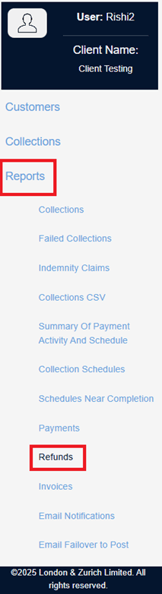
- From the left-hand menu, select Reports > Refund
- Enter the date range when the refund was requested and select Search.

- Find the refund request in the results list.
- The affected settlement will be displayed under:
- Settlement ID
- Settlement Date

-
If you need more details on your settlements/payouts:
-
- Go to Reports > Payments.
- Use the Settlement ID and Settlement Date to locate the full settlement record.
- Open the settlement to view all associated transactions.
-
If you need additional help, please contact our support team via email customer.services@landz.co.uk