![LandZ Logo - Royal Blue.jpg]](https://go.londonandzurich.co.uk/hs-fs/hubfs/LandZ%20Logo%20-%20Royal%20Blue.jpg?height=40&name=LandZ%20Logo%20-%20Royal%20Blue.jpg)
How can I tell what date a refund will credit the customer's bank account?
You can view the expected date a refund will credit a customer’s bank account in the Refunds report.
To locate this information:
- Log in to the portal.
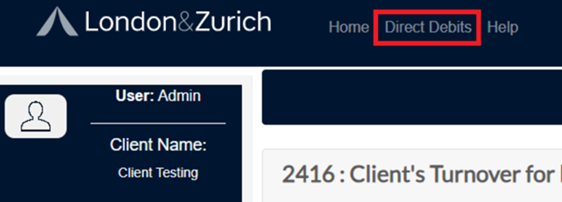
- Click Direct Debits at the top of the screen.
3. Go to Reports > Refunds.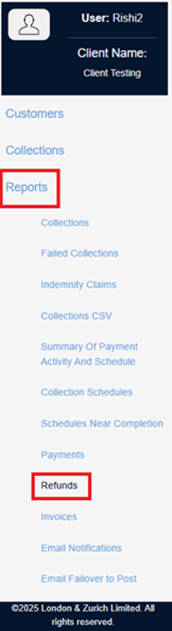
4. Enter the date range in which the refund was requested and select Search.

5. Find the relevant refund request in the results list.
6. The date the refund will be credited to the customer’s account is shown under Customer Settlement Date.
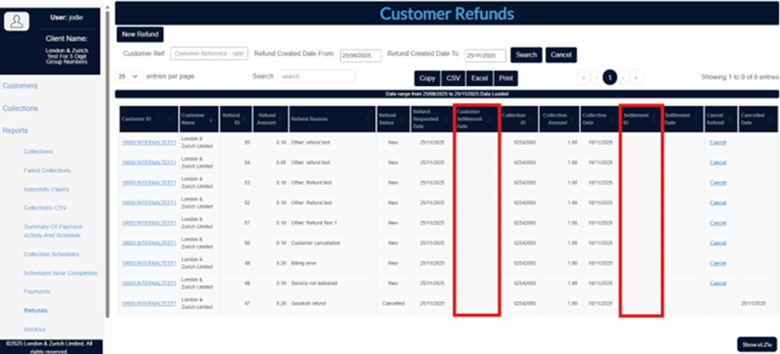
This date reflects when the funds are expected to reach the customer’s bank.
If you need additional information, please contact our support team via email customer.services@landz.co.uk