![LandZ Logo - Royal Blue.jpg]](https://go.londonandzurich.co.uk/hs-fs/hubfs/LandZ%20Logo%20-%20Royal%20Blue.jpg?height=40&name=LandZ%20Logo%20-%20Royal%20Blue.jpg)
To obtain a list of all your customers, active and/or inactive, including their address, telephone number and email address please follow the steps below:
-
Log in to the L&Z portal
-
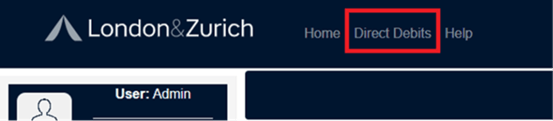
Click Direct Debits on the top bar menu
-
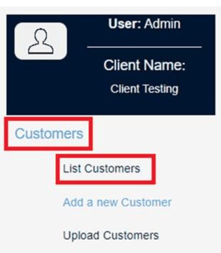
From the left-hand menu, select Customers > List Customers.
-
This will display all recent customers as a default.

-
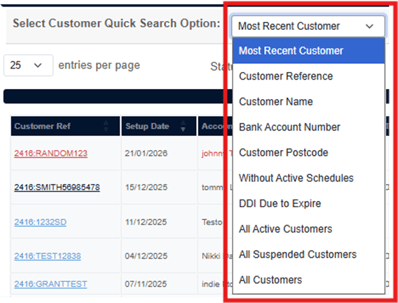
If you wish to filter out inactive customers, or any other status, you can use either of the filters as shown below:
-
Or to sort each column
-

-
Each column has an up and down arrow, click on either of these to sort ascending or descending by the columns of your choice:

You can also export the data to an Excel file and sort the column of your choice in the file.
Alternatively download the list as CSV or PDF.
It is not possible to obtain a list of customer details which includes their bank details as a download from the portal. If you require this data please contact customer.services@landz.co.uk to request it.
For support, contact customer.services@landz.co.uk.