![LandZ Logo - Royal Blue.jpg]](https://go.londonandzurich.co.uk/hs-fs/hubfs/LandZ%20Logo%20-%20Royal%20Blue.jpg?height=40&name=LandZ%20Logo%20-%20Royal%20Blue.jpg)
No. Once a refund has been requested, it cannot be amended.
If the option is available, you will need to cancel the existing refund and then submit a new refund request with the correct amount.
How to cancel a refund;
- In the L&Z system, go to Direct Debits at the top of the screen.

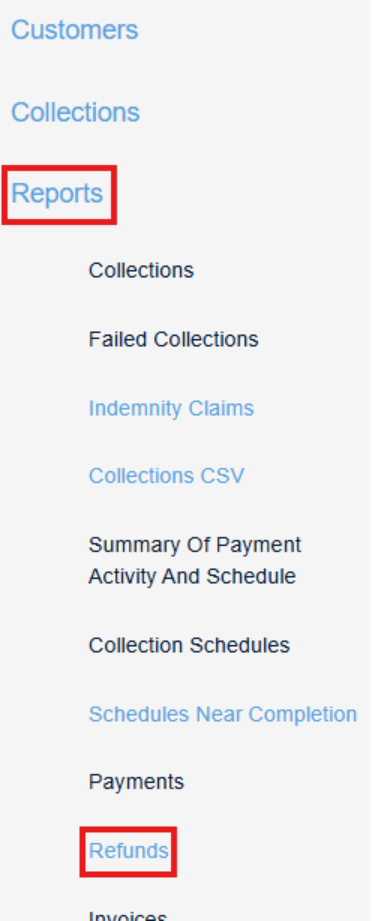
- In the left-hand menu, select Reports > Refunds.
- Enter the date range in which the refund was requested and click Search.

- A list of refund requests will appear.
- If cancellation is available, you will see a Cancel option next to the refund. Select this to cancel the request.
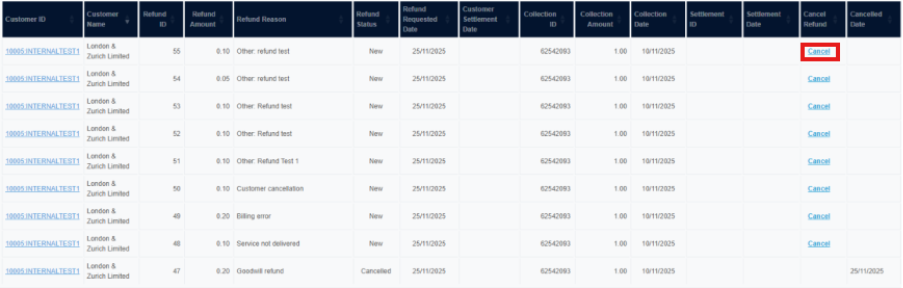
Once the refund has been cancelled, you can then submit a new refund for the correct amount.
Important note
- The option to cancel a refund is only available until 8am on the next working day after the refund request was made.
- After this time, the refund can no longer be cancelled or amended.
If you have any questions, please contact our Customer Services team at customer.services@landz.co.uk.